How to Pimp Your Google+ Profile Design – Download Template

The web is alight with Google+ fever at the moment, and it seems that Google might have come up with a Social Networking concept that will truly challenge Facebook.

Like everyone else we’ve been getting to grips with how to get the best out of our profiles.

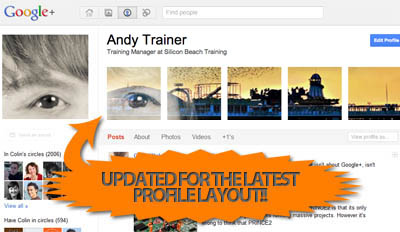
We’ve also devised a natty method for customising your Google+ profile design using tiled images.
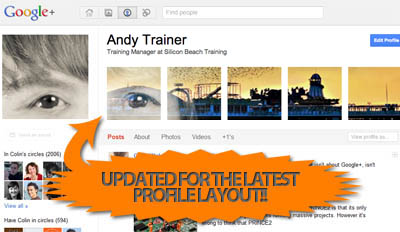
pimp-your-google-plus-profile-updated

pimp your-google+ profile

And what’s more we’ve put together a Photoshop Template to make it easy to implement for anyone who knows a bit of Photoshop (for those that don’t – we run a great 2-day Photoshop course here in Brighton!)

We’re sure you can all come up with some brilliant and creative ways of using the method to customize Google+ profiles that really stand out – we’d love to see the results – so if you use our template please post a link to your profile in the comments section so we can check out your work.

If you’re on Google Plus – follow us in the following places for all our goodies: Andy Trainer | Heather Buckley

Here’s our step by step guide to customize your Google+ Profile using our PSD Template.

NEW – Check out our selection of the most creative Google+ profile designs!

Similar posts you may like

Tags

, , , , , , , , , , , ,

Share This Post

16 Responses to “How to Pimp Your Google+ Profile Design – Download Template”

Andy @ iNet SEO says:

Never thought about doing this so gave myself a pimping just using an imagine I had lying around :)

http://gplus.to/inetseo

Thanks for the great idea!

Andy :)

Colin Welch says:

Hi Andy – Looks good – Glad you found it useful.

Andy @ iNet SEO says:

I did in deed Colin – and just added you guys to my circle too :)

Regards,

Andy

P.S No idea if you have tried this, but G+ also works great as a private bookmarking tool. Just create and empty circle with no-one in it and share your book marks with that circle. Then just refer to the clickstream for that circle to get all of your bookmarks.

Josh says:

Awesome tutorial! thanks for providing the photoshop download as well!

Kate Sumbler says:

Very cool tip! I pimped my profile up in about 10 minutes using your template!

https://plus.google.com/102894474794183112649/about

10 Google+ tips and tricks | memeburn says:

[...] nerd hasn’t figured out a hack already. If you’d like to personalise the theme, here is a cool PSD template to use.10. Photo albumsAnd finally, if you want to import Facebook albums, here’s another hack [...]

Leo Kobes says:

Perfekt! I managed it, https://plus.google.com/113898836854834279153/about

Thanks for the description !

SEO Daily links and Adobe Bridge and rel-author | GaBlog says:

[...] My fun learning of the day: how to make a cut up a horizontal portrait of myself and place it in cool chunks onto my Google+ profile page, or as the authors of the guide call it: How to Pimp Your Google+ Profile Design. [...]

Gabor Por says:

Got it: https://plus.google.com/100673026781738592391/about

Bruce Prock says:

thanks for the tip. here are the results on my profile.

https://plus.google.com/105511974890466252397/about

Google+ How to Make it Work for your Business | : JRC says:

[...] – an absolute must for sharing with friends.  Silicon Beach Training show you how to “Pimp your Google+ Profile Design” along with a list of tips and tricks, including how to view your Profile [...]

Tips Tuesday with G+, Sidebars, MailChimp and More says:

[...] Beach Training has a nice post on how to pimp your G+ banner pix across the top of your [...]

Social Web Designer says:

LOL Andy @ iNetSEO i SO needed to see your video.
;)
sandy

HelpingYouHire says:

Great tutorial!

Can’t wait to get started on it. Being a Staffing Consultant for a Staffing Solutions Company it sure will be useful to me.

http://staffing-solutions.biz/resume-mining.html

jackedup.me says:

very nice work… keep uploading good things like it..

Leave a Reply

 
Request a callback

Follow Silicon Beach Training

Sign Up For Our Newsletter

Exclusive offers, free resources and the latest tech & business news

Home | Sitemap | Print |