Enquiry Now


 Contact Us



 Check Out
 +44 20 4571 2395

 PRINCE2® Foundation and Practitioner Training



 Aaron Charlie
 19 Feb 2010

Hootsuite vs. Tweetdeck -Which Is Best?
Once you are up and running on Twitter it can be tricky to catch the best tweets or keep an eye on all of your mentions. TweetDeck and HootSuite attempt to solve those problems, with their user-friendly and functional interfaces really enforcing Twitter's place as a useful tool for businesses.
Update: Since we wrote this Twitter launched its new interface which is more user friendly to tempt people away from 3rd party Twitter clients.
The uninitiated may wonder what the fuss is all about, but these Twitter tools are highly addictive once you get started - the only problem is, which one should you use? Of course if you're new to Twitter and other social media platforms our social networking training in Brighton, Sussex, may be a help to get you started.
A Comparison of TweetDeck and HootSuite
These two tools have some shared benefits: keep on top of what's going on with customised and easy to manage columns; reply, re-tweet and direct message with a click; download a mobile phone application, and manage multiple accounts on Twitter or other social networks. The differences between HootSuite and TweetDeck are subtle, but may be key to which application you choose; read on for our comparison.
TweetDeck Review
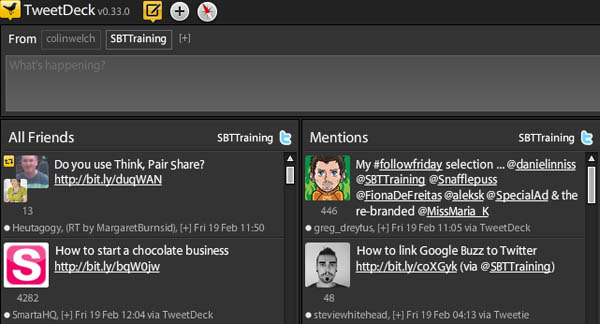
The advantages of TweetDeck
- Pop-up notifications: TweetDeck is a computer program which can run in the background and keep you updated throughout the day, great for keeping up your tweeting throughout the day without referring back to Twitter.
- Link with other social networks: as well as Twitter you can link to Facebook, Myspace and LinkedIn.
- Manage multiple accounts in one window
- Auto-shorten URLs
- Simple interface: of course the standard grey and white colour scheme is down to personal taste, but the layout is simple, fast and uncluttered.
- Unlimited columns: this is a major advantage for TweetDeck, with as many columns as you like of mentions, real-life friends, business contacts, industry leaders, search phrases you are watching - as well as standard friends, replies and direct messages.
The disadvantages of TweetDeck
- Statistics: statistics can be viewed through bit.ly or your chosen URL shortener (see Settings), but this requires a separate username and password.
- Reliability: it can be a bit flaky sometimes, and you may find you miss a tweet or mention which simply hasn't shown up in TweetDeck
HootSuite Review
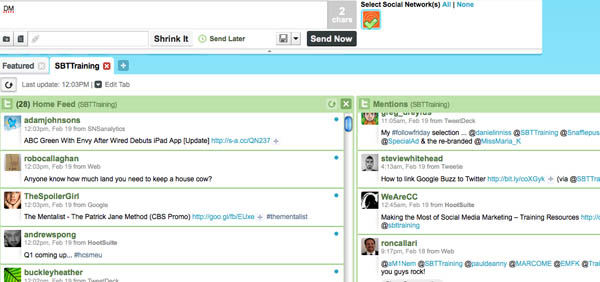
The advantages of HootSuite
- Website: although there're no pop-up notifications, the website platform is arguable better as there's no downloading, less computer power and you can log in anywhere.
- Schedule tweets: schedule your tweets or status updates for other accounts (and also save them as drafts) - great if you want to post a link to a blog post over the weekend for example.
- Link with other social networks: link to Facebook, LinkedIn, WordPress and Ping.fm (through it you can update Myspace and LiveJournal).
- Statistics: this is HootSuite's major advantage with well-presented and easy to view link tracking and analytics - though beware as you'll need to ensure you shrink all your URLs with the Ow.ly shortener first.
- User management: this aspect is crucial for businesses for whom security is important, with the option of multiple usernames and passwords for one Twitter account - initials can show with updates and HootSuite can keep track of timezones.
- Reliability: many users comment that HootSuite seems to update more regularly, or at least consistently.
- Lots of columns: Limit of columns in a tab is 10. With that said, if you want to add more than columns, you can create a new tab for them. On the matter of tabs, you don’t need them to view multiple accounts: for instance, you can organize all your home or news feeds in one tab, and all your sent status updates in another. The sky is really the limit as far as how users choose to organize their tabs.
The disadvantages of HootSuite
- Phone application isn't free: but don’t be surprised if a free edition is released soon - see comment from Hootsuite below
- No auto-shortening: there's a separate box if you want to shorten your URL - annoying if you want to make use of statistics.
- Clunky interface: this one is perhaps down to personal taste, and HootSuite is certainly big, bold, colourful and perhaps more in-keeping with the actual Twitter website. However, you need to use tabs if you want more than 10 columns and what with no auto-shortening and limited columns HootSuite is overall a bit more clunky to use.
TweetDeck or HootSuite – The conclusion
TweetDeck is excellent for real-time use when you want to keep consistent with your conversations and it's no headache to use with a user-friendly interface. On the other hand, HootSuite is more functional in a number of ways such as user management, scheduling and statistics, and it definitely takes the biggest step towards creating a highly usable Twitter application for businesses. Overall I'm veering toward TweetDeck as it succeeds in making Twitter such an easy to use tool. But then again, if HootSuite made some subtle changes I could easily change my mind.
Posted under:
 Need Any Help?
Recent Blogs