Enquiry Now


 Contact Us



 Check Out
 +44 20 4571 2395

 PRINCE2® Foundation and Practitioner Training



 Heather Buckley
 2 Mar 2011
No sound on Youtube video or Flash on Mac?
Just a very quick post as this has been driving me mad since I got my new Power Mac using OSX. I had sound on the computer for most things but no sound on YouTube and some Flash animation.
Having a look around for the answer, as usual I was presented with lots of complicated fixes. I chose the simplest and it worked straight away with out having to download anything dubious!
Q: How do I get sound on Youtube on my Mac?
A: delete the /Library/Preferences/Macromedia folder
Simples ;)
If you are looking for PRINCE2 training, ITIL training, ISTQB training or MSP Training why not call and book a course in Brighton, Sussex. It's the place to be! Take a look at our full range of training courses.
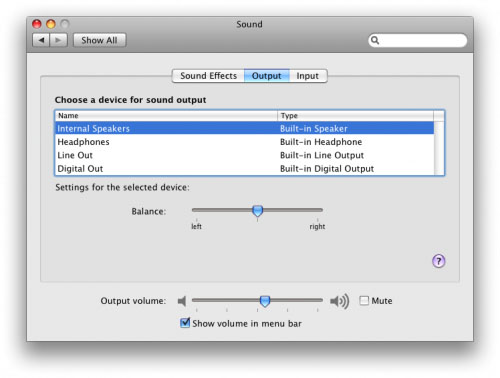
No sound on Mac reset sound options
No Sound on Mac Update
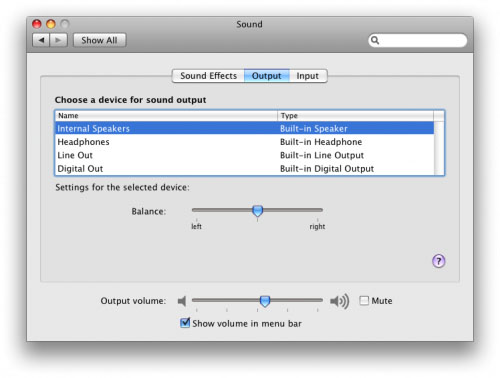
Some people may find that after installing Mac OS X 10.5.6 update your Mac may appear to have lost it's sound. For some reason the update sets the sound output to “Headphones” instead of “Internal speakers”. You will need to set it back to “Internal speakers” to get the sound back.
Posted under:
 Need Any Help?
Recent Blogs